

Table of Contents
Facing a ‘declined’ status or an approved grant with no money in your account for January 2026? This comprehensive guide investigates the most common and hidden reasons for SASSA SRD R350 grant failures. Learn to decode cryptic rejection reasons, fix persistent bank detail errors, and understand the system glitches that SASSA doesn’t talk about. We provide the solutions and proactive strategies you need to secure your grant.
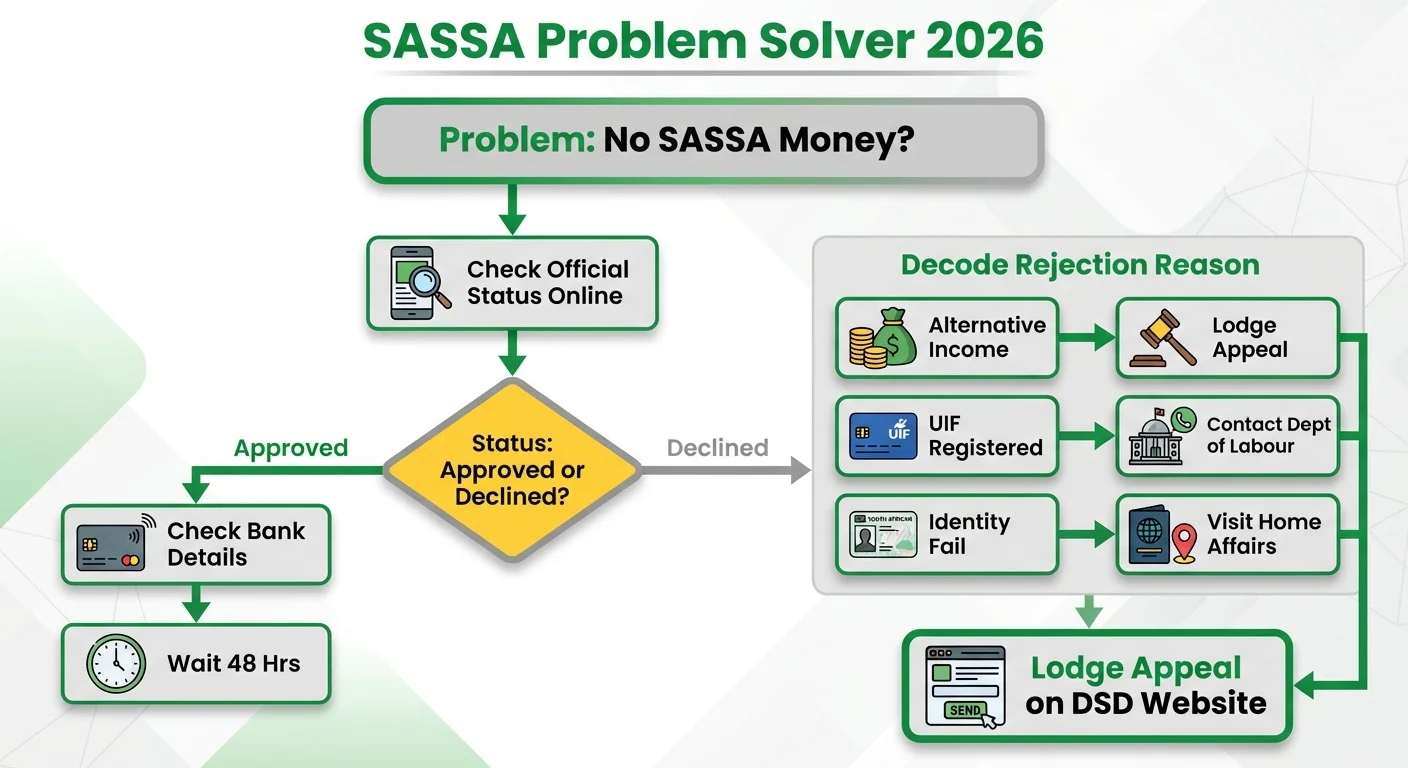
The Nightmare Scenario: Approved But Your Bank Account is Empty
It’s the most frustrating experience for any SASSA beneficiary in January 2026. You diligently check your status online using the SRD Status Check tool, and it shows ‘Approved’. You see a pay date. You wait, check your account, and… nothing. This isn’t just bad luck; it’s a systemic issue we call the ‘Ghost Payment’ problem.
Before you panic, understand the process happens in stages. Approval is just the first step. After that, SASSA generates a payment file and sends it to the banks. A failure can happen at any point in this chain. The most common culprits in 2026 are:
- Bank Verification Failure: This is the number one reason for ‘ghost payments’. SASSA’s system cross-references your ID number and name with the details held by your bank. Any tiny mismatch—a typo in your name, an incorrect ID number, or a middle initial that SASSA has but your bank doesn’t—will cause the payment to bounce back. The system is automated and unforgiving.
- Dormant or Closed Accounts: If you haven’t used your bank account in several months, the bank may have marked it as dormant. SASSA cannot pay into a dormant or closed account. It’s crucial to ensure your account is active.
- Incorrect Banking Details: It sounds simple, but thousands of grants fail each month because of a single digit error in an account number or the wrong branch code. Always double-check the details you provided during your SRD Grant Application.
- Payment File Delays: Sometimes, the issue is on SASSA’s end. The payment file for a specific batch of beneficiaries might be delayed or corrupted, causing payments to arrive a few days later than expected. While frustrating, this usually resolves itself. The key is to wait 48-72 hours after the pay date before escalating the issue.
Decoding SASSA’s Cryptic Rejection Reasons for 2026
A ‘Declined’ status is heartbreaking, especially when the reason feels unfair or makes no sense. Let’s break down the most common rejection codes of 2026 and what they really mean, plus what you can actually do about them.
Reason: ‘alternative_income_source_identified’
What SASSA Thinks: Their system has matched your ID number with a database (like UIF, SARS, or NSFAS) that shows an income of more than R624 flowing into your bank account during the assessment period. What It Could Actually Be:
- A friend or family member sent you money for groceries.
- You received a small, once-off payment for a temporary job.
- Your bank records are outdated, showing a previous employer’s payment.
- A system error incorrectly flagged a transaction. Your Solution: This is the most common reason for rejection and the most important one to appeal. If you believe the income was not a salary or does not exceed the threshold, you must file an appeal. Gather any proof you have (bank statements showing the nature of the deposit, an affidavit). Your first step is to visit our comprehensive SASSA Appeals Guide.
Reason: ‘identity_verification_failed’
What SASSA Thinks: The personal details you provided (name, surname, ID number) do not match the records at the Department of Home Affairs (DHA). What It Could Actually Be:
- A simple typo during your application.
- You recently got married and changed your surname, but DHA records are not yet updated.
- The DHA system was temporarily down when SASSA tried to verify you. Your Solution: First, triple-check the details you submitted to SASSA. If they are correct, the problem lies with your DHA records. You may need to visit a Home Affairs office to verify that your details are correct on their system. You cannot fix this within SASSA itself. Once DHA confirms your details are in order, you should appeal the decision.
Reason: ‘uif_registered’ or ’nsfas_registered’
What SASSA Thinks: You are currently receiving benefits from the Unemployment Insurance Fund (UIF) or are funded by the National Student Financial Aid Scheme (NSFAS). What It Could Actually Be:
- You were previously employed and are still on the UIF database, even if you are no longer receiving payments.
- You are registered at a university, and NSFAS records show you as a beneficiary, even if you haven’t received funds yet.
- The data SASSA is using is outdated. Your Solution: You must contact the relevant department directly. For UIF issues, contact the Department of Labour. For NSFAS, contact them to clarify your funding status. Get written proof that you are not an active beneficiary and submit this as part of your SASSA appeal. It’s frustrating, but SASSA will only act on information confirmed by the other department.
The Bank Details Nightmare: How to Get It Right Once and For All
More than half of all payment failures are linked to banking details. SASSA is extremely strict because they are trying to prevent fraud. Let’s solve this for good.
The Golden Rule: The bank account MUST be in your name. You cannot use a friend’s, spouse’s, or child’s bank account. The system will automatically reject it.
Your 2026 Banking Details Checklist:
- Is the account in your exact name? Your name must match your ID document and Home Affairs records perfectly. No nicknames, no shortened versions.
- Is the account active? If you haven’t used it for 30-90 days, contact your bank to ensure it’s not dormant. A simple R10 deposit can often reactivate it.
- Are the details 100% correct? Log into your banking app or check a statement. Do not guess your account number, bank name, or branch code.
- Are you using your own cell phone number? The phone number linked to your bank account should ideally be the same one you used to apply for the SASSA grant.
How to Update Your Bank Details Correctly in 2026: If you suspect an error, you must update your details on the official SASSA SRD website. Look for the ‘Update Your Bank Details’ link. Be aware that this change can take a full payment cycle to take effect. This means if you update your details in January, you might only see the payment reflect in the new account in the February or March payment run. For the most up-to-date schedule, always check the official SASSA Payment Dates page.
Proactive Strategies: What Successful Beneficiaries Do Differently
Getting your grant isn’t about luck; it’s about being proactive. People who consistently receive their grants without issues tend to follow a simple set of habits. Adopt these, and you’ll spend less time troubleshooting and more time benefiting.
- They Perform a Monthly Health Check: Don’t just wait for payment day. At the beginning of each month, they do a quick SRD Status Check. This gives them early warning if a new issue has popped up, allowing them time to fix it before the payment run.
- They Keep Meticulous Records: Every time they interact with SASSA—be it an application, a status check, or an appeal—they screenshot the confirmation page. They save their Application ID and any reference numbers in a safe place. This information is gold if you ever need to query an issue.
- They Only Use Official Channels: They ignore WhatsApp rumours and fake news websites. They get their information directly from the SASSA SRD website, the official SASSA Twitter account, or reputable news sources. They know that using scam links can get their details stolen.
- They Understand the Monthly Cycle: They know that SASSA re-evaluates every single application, every single month. Just because you were approved in December doesn’t guarantee approval in January. They understand that their financial situation is checked monthly against various databases, so they are prepared for their status to change.
The PostBank & Cash Send Challenge: A Last Resort?
For beneficiaries without a bank account, collecting the grant via a retail partner (like Pick n Pay, Boxer, Shoprite) using the Cash Send option is the only choice. While it’s a vital service, it comes with its own set of 2026 challenges.
- System Downtime: The payment systems at retailers are prone to going offline, especially during the first few days of the payment cycle when demand is high. This can lead to long queues and wasted trips.
- Reliance on SMS: The Cash Send option relies on you receiving an SMS from SASSA with a payment voucher. If you lose your phone, your SIM card is inactive, or there are network delays, you won’t get your money.
- No Fixed Date: Unlike bank payments, the Cash Send option does not have a fixed payment date. You must wait for the SMS confirming your funds are available for collection. This makes financial planning incredibly difficult.
Our Analysis: While Cash Send is better than nothing, we strongly advise all beneficiaries to open a bank account if possible. Many banks in South Africa offer low-cost or zero-fee accounts perfect for receiving grants. It’s more reliable, safer, and gives you immediate access to your funds on the scheduled payment day. This simple switch can eliminate a huge amount of stress and uncertainty.
Frequently Asked Questions
My SASSA status has been 'Pending' for all of January 2026, what should I do?
I updated my banking details but SASSA still paid into my old account. Why?
Can I use someone else's phone number for my SASSA application?
My grant was approved for three months, but then it was declined in January. Why did it stop?
I received an SMS to collect my money, but the store says there are no funds. What's wrong?
SASSA says I am 'deceased' but I am alive. How do I fix this?
What does the rejection reason 'referred' mean?
My appeal was approved but I still haven't been paid for those months. What happens now?
Read Next
SASSA's New 'Mandatory App' Locks Your R390 Grant? The 2026 Guide for Beneficiaries Without a Smartphone
BREAKING April 2026: SASSA is rolling out a mandatory new smartphone app, …
The R140 Paraffin Price SHOCK: How 40% of Your R390 SASSA Grant Will Vanish on May 1st, 2026
BREAKING April 2026: NERSA has approved a devastating 40% increase in the price …
Comments & Discussions