
Table of Contents
If you’re currently stuck in a digital loop with the new SASSA ‘Thandi’ AI chatbot, I feel your pain. It launched in February 2026 to supposedly make things easier, but let’s be honest: it’s mostly just a wall between you and your money. This guide is my attempt to help you break through the noise. I’ll show you why the bot is failing and, more importantly, give you the exact steps to bypass it and talk to a human about your status, payments, or appeals.
The ‘Thandi’ Revolution: SASSA’s AI Helper or a New Digital Headache?
SASSA called this a “leap forward” for social support when they rolled out ‘Thandi’ in early February 2026. The pitch was that you’d get instant, 24/7 answers for your grant questions. But for thousands of people, it’s turned into a total mess. Instead of getting help, people are getting trapped in repetitive conversations that go nowhere.
I’m seeing reports from all over South Africa, from Gauteng to the Eastern Cape, where ‘Thandi’ can’t even understand basic Zulu or Xhosa phrases. It gives out old information and seems completely lost if your question is even slightly complicated. This isn’t just a small tech glitch. It’s a real problem for people who need their grants to survive. I’m writing this to provide the solutions SASSA isn’t giving you. We’re going to look at why this system is broken and how you can use the older, more reliable ways to get the help you actually deserve.
The Loop of Frustration: Top 5 Failures of the SASSA Chatbot in February 2026
To get past the bot, you have to know where it trips up. Based on what people are actually experiencing this month, here is why ‘Thandi’ keeps failing:
- It doesn’t understand how humans talk. The AI is terrible with slang or typos. If you ask “My R370 didn’t come thru,” it might just give you a generic definition of what an SRD grant is. It wants you to talk like a computer, which is just not how people communicate.
- There is no way to escape. This is the part that really bothers me. When the bot gets confused, it doesn’t offer to put you through to a person. It just repeats itself. It’s like hitting a digital brick wall.
- It uses old news. People have reported the AI giving out payment info from 2025. This is actually dangerous because it could send you to the wrong pay point or make you submit the wrong forms for an appeal.
- It can’t see your actual file. Unlike the SRD Status Check portal, Thandi often can’t tell you anything specific about your account. She can explain what “approved” means, but she can’t tell you why your February 2026 payment is still missing.
- It crashes when you need it most. The system is constantly overloaded. On payment dates, when everyone is trying to get answers, the bot often just goes offline or freezes. You can’t rely on it when things get urgent.
The Human Bypass: 3 Proven Methods to Get Past ‘Thandi’ and Talk to a Real Person
When the robot fails, you need a human. Don’t waste your afternoon arguing with an AI. Use these tricks to get through to someone who can actually help.
Method 1: The Keyword Trick.
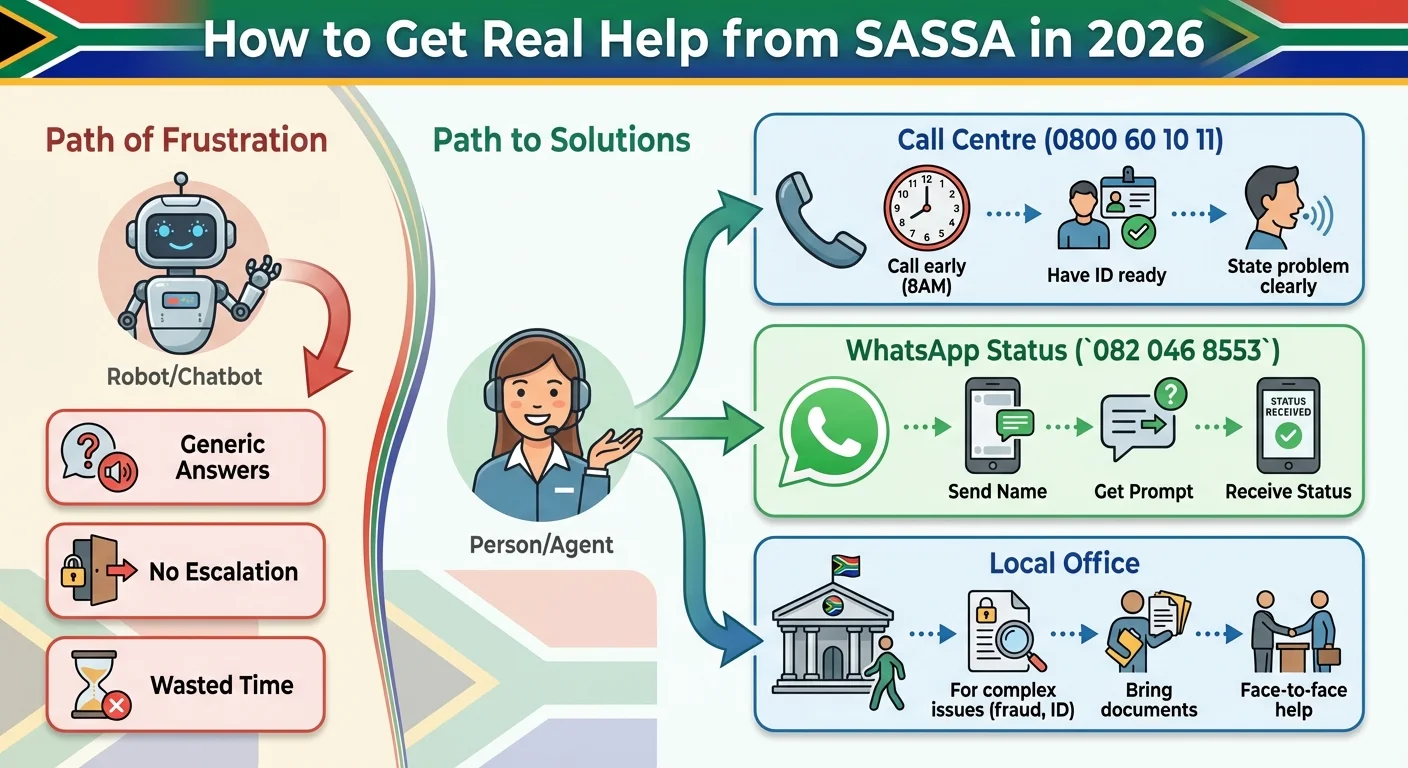
Bots are often programmed to hand you over to a person if you use specific words. Don’t bother explaining your whole story to Thandi. Just type "Speak to an agent", "Human representative", or "Complaint". Do it two or three times in a row. It’s not a guarantee, but it often triggers the system to put you in a live queue.
Method 2: The Direct Call Centre Offensive. Skip the website and pick up the phone. The SASSA National Call Centre (0800 60 10 11) is still your best bet. Here is how I would handle it in 2026:
- Call at 8 AM sharp. If you wait until noon, you’ll be on hold forever.
- Have your ID in your hand. Don’t make the agent wait while you look for your ID or the phone number you used for your application.
- Get straight to the point. Say something like: “My name is [Name], ID number [ID]. My February 2026 SRD grant is approved but I haven’t been paid.”
Method 3: The In-Person Visit. If your problem is serious, like identity theft or bank details that won’t update, a chatbot will never fix it. You need to go to a SASSA office or a Thusong centre. I know the queues are long, but a ten-minute conversation with an agent who can see your screen is worth more than three days of fighting with a bot. Bring every document you have so you don’t have to go back twice.
Old School Still Rules: Why Traditional SASSA Contact Methods are Your Best Bet in 2026
SASSA is pushing this new technology, but the old ways are still the most reliable. The mess with ‘Thandi’ shows that “new” isn’t always better. Here is how to use the channels that actually work.
SASSA Call Centre (0800 60 10 11): This is still the best way to get help. You can actually talk through a problem. Even with the wait times, a trained person is much more helpful than an AI.
The SASSA WhatsApp Status Check (
082 046 8553): Don’t confuse this with the new chatbot. This number is a simple tool. It doesn’t “chat” with you, and that’s a good thing. You save the number, send your name, and it asks for your ID. It’s fast and it gives you your SRD R370 status without any drama.Department of Social Development Email (grantenquiries@sassa.gov.za): If your issue isn’t an emergency, use email. It gives you a paper trail, which is vital if things go wrong. Use a clear subject line like “SRD Grant Appeal for ID: [Your ID Number]”. Explain the problem and attach your bank statements or ID. It takes a few days, but a human in a specific department will actually read it. If you’re dealing with a declined grant, this is much better than talking to a bot. You can also look at our Appeals Guide for more help.
Your Ultimate SASSA Contact Checklist: The Right Tool for the Right Problem in 2026
If you’re feeling overwhelmed, just use this list to figure out where to go.
Use the ‘Thandi’ AI Chatbot IF:
- You have a simple question about what documents you need to apply.
- You just want to see if the system is even working today.
Use the SASSA WhatsApp Status Check (082 046 8553) IF:
- You only want to see your current SRD grant status. This is the fastest way to do it.
Use the SASSA Call Centre (0800 60 10 11) IF:
- Your status says ‘approved’ but you have no money.
- You need to change your phone number or banking info.
- You suspect someone is committing fraud on your account.
Use a SASSA Local Office (In-Person) IF:
- Your grant was suspended and you have no idea why.
- You need to hand in physical papers or affidavits.
- You are a victim of ID theft and need to prove who you are.
Use the SASSA Enquiries Email IF:
- You are submitting documents for an appeal.
- You want a written record of what SASSA told you.
- You can afford to wait a few days for an answer.
Frequently Asked Questions
What is the new SASSA AI chatbot 'Thandi'?
How can I bypass the 'Thandi' chatbot and speak to a person?
Is the new AI chatbot the same as the SASSA WhatsApp number?
082 046 8553) is a simple, automated service specifically for checking your SRD grant status. For a quick status update, the WhatsApp number is currently more effective.Why isn't the SASSA chatbot giving me a real answer about my payment?
The chatbot gave me incorrect information. What should I do?
Can I use the chatbot to submit an appeal?
What is the best way to get help from SASSA in February 2026?
082 046 8553). For any complex issues requiring a conversation, such as payment problems, fraud, or updating details, your best option is to call the National Call Centre at 0800 60 10 11, preferably early in the morning.Is it better to visit a SASSA office in person?
Read Next
SASSA's New 'Mandatory App' Locks Your R390 Grant? The 2026 Guide for Beneficiaries Without a Smartphone
BREAKING April 2026: SASSA is rolling out a mandatory new smartphone app, …
The R140 Paraffin Price SHOCK: How 40% of Your R390 SASSA Grant Will Vanish on May 1st, 2026
BREAKING April 2026: NERSA has approved a devastating 40% increase in the price …
Comments & Discussions